
40 Tips and 60,000 Takes
First published: Sunday November 9th, 2025
Report this blog
Intro
1 JetPunker. 2 features. 3 years. 6 spotlights. 11 badges. 14 series, 18 blogs, 48 subscribers, 58 levels, 83 friends, 310 quizzes. 60,000 takes...
Haha, we've come a long way. I never thought I would reach 60,000 takes here now, but yet, here I am. I won't bore you with a long list of everyone who has helped me get here, or my entire story.
I don't want this to be another boring milestone blog - in my opinion, there's no point in reading something if it isn't to someone's benefit.
So...here are 50 tips and tricks to improve your JetPunk quizzes!
40 Quizmaking Tips and Tricks
Making a Better Quiz
———————————————————————————————————————————
#1: Make a new format. Now, I don't mean create a new official format, but a unique quiz structure that hasn't been done before, such as Stewart's Category Elimination or Fuse's Crossword Puzzles. A quiz can have the exact same answers but a different format and be revolutionized, so use that to your advantage!
#2: Nail the idea and the execution. Fail at one of them, your quiz will not be so good, no matter how great the other factor is. Here's a little chart that gives you the idea:
Here are nine of my quizzes I've used as examples. The higher the quiz, the better the idea, and the better the execution, the further to the right the quiz is. Nail both execution and concept, you have a great quiz. If you don't...not so much.
#3: Make the player think, but not a lot. You want people taking your quiz to have that 'OhHhhhHhhh, I'm dumb' feeling, not the 'that's literally the same thing' feeling. Unless the entire quiz is a puzzle in the first place, every question shouldn't be an entire thing you have to piece together.
#4: Don't make it tedious. If anyone is REMOTELY bored in playing your quiz because it forces you to spam the A key or scroll for miles, it's probably a bad quiz. If you're doing a true or false quiz, use the click quiz format instead of multiple choice, as it's much more enjoyable to play. Make it easier for the person taking the quiz.
#5: Use what isn't supposed to be used. Now, I'm not saying you should do anything malicious or abuse CSS, but think unconventionally. For example, in my How Good Are Your Eyes quiz I used the background and text color in a way that wasn't meant to be done. Doing this is bound to make a good quiz, or at least a unique idea.
#6: Gauge your own quiz. Personally, I ask myself two questions: "Would I go out of my way to take this quiz?" and "Would I feature this quiz?" If you wouldn't want to play your own quiz, I doubt other people would either. If you wouldn't want to feature your own quiz, maybe it could use some polishing.
#7: Sorry, you need to learn coding and SVG. Let JetPunk manipulate the way you make quizzes, or learn to manipulate JetPunk. Chances are, the best quizzes you've seen on JetPunk use an SVG or code in some way.
#8: Sorry, you also need to learn RegEx. Not only does RegEx make a quiz better to take, but you can also do some rather creative things with RegEx, especially with the whammy feature. For example, making a quiz where you can't type five letters, or you can't type the letter 'A'.
#9: Use humor. Take the quiz Click Fast to Save the USA for example: those little extra hints really brighten up the quiz and are a very nice touch - no, they're most of the entire quiz. It would be very bland without these...anyway, a funny concept or quiz is going to be more memorable and make the quiz better overall, if done well.
#10: Make things difficult the right way. Simply put, a quiz isn't good if the entire challenge is trying to read the words in the first place (on second thought...nevermind). The point is, unless the challenge is reading the words in the first place, don't make the words hard to read, especially if you're not using default styles.
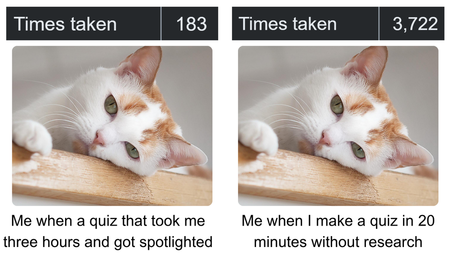
#11: Study quizzes. Why do you like so and so? Actually think about what makes a quiz good, then apply that to your own quiz. Works wonders.
#12: Learn how to make a bad quiz. You need to make a bad quiz before making a good quiz. Similar to #11, you'll also have to look at what makes a bad quiz bad. Make a bad quiz, take it from there.
Also, the comments section will be glad to point out the most miniscule errors you'd never find, so don't worry about those.
Getting More Takes
———————————————————————————————————————————
#13: Optimize the search engine. Use that search bar to your advantage! Making your quiz name similar to a popular quiz is likely to get more takes. Also, note that punctuation, the word 'quiz', and articles like 'the' and 'and' are ignored during a search. 'Country' also counts for 'countries', and so on, so keep this in mind!
#14: Submit quizzes at the right time. You may have seen this blog before, which covers the idea pretty well, but generally, use common sense. If you're publishing a quiz in French, probably best to schedule it for when people in France are awake.
#15: Make your quizzes replayable. This is pretty much self-explanatory, but a Sudden Death or a randomized quiz has a replayable factor, so you'll get more takes this way.
#16: Advertise (right). Of course, advertising is one way to get noticed, whether it be on the Discord or the Message Board. But, advertise correctly. Put some time into it, make sure the quiz is actually unique and hasn't been seen before, and don't advertise very often.
#17: Make sure everyone can play it. It's fine to make niche quizzes (but please, not too niche), but a quiz that everyone can play, such as a memory quiz, is likely to get more takes.
#18: Make a good title. A good title usually gets the point across - you should be able to know what a quiz is about from the title, or else there's not much point in taking it. Making a more interesting title that may not get the point across can be fine as long as it sounds intriguing, but generally a title should be simple but descriptive.
#19: Build a schedule. This might be difficult for some people, me included, but actually consistent publishing works well for getting takes. Or, you can also keep it looser and do something like, say, Flag Fridays, and random stuff throughout the rest of the week.
#20: Don't try too hard to get takes. But what about all these tips I just told you? The premise is simple - begging for takes like you're a homeless guy living in a tent isn't going to help much. You can get takes if you make a good quiz, so why not refer to some of the previous?
Using the Editor
#21: Use Ctrl + Shift + V. Instead of typing a hundred rows of data, copypasting, say, a hundred rows of population values will save you an hour or two.
#22: Use some subtle code. Sure, maybe you can't turn the quiz inside out, but you can give the thumbnail a border radius! Subtle difference makes things look a whole lot nicer.
#23: Think smarter, not harder. You can use some really simple CSS to fix a quiz up easily. For example, say you want every box in a sudden death quiz to be square, you could use this:
----------------------------------------
<style> .quiz-container .grid-item {aspect-ratio: 1 / 1;} </style>
----------------------------------------
And, there you go, instead of adding that to every single box or messing around with width and height (which can be a bit weird sometimes), you have an easier way to do it.
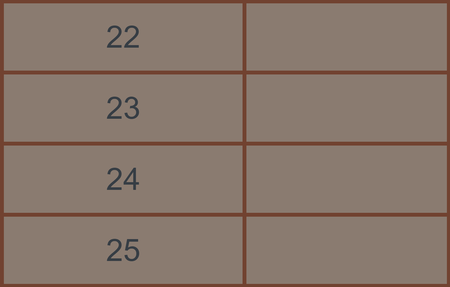
#24: Use the import and export feature. I feel as if most users don't use this, probably because it looks something like this:
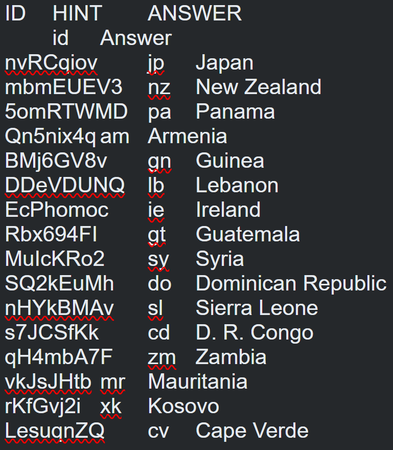
And understandably, this looks rather...nerdish. But also, a very great feature that saves plenty of time, and should definitely be used more. You can also use this feature to port answers to different formats (though most of them have different columns, and you'll need to change these up a bit).
#25: Finding answer IDs. If you ever need to find the answer IDs for a quiz, you can easily find them by looking in the 'ID' column after clicking export.
#26: Hosting images. If you ever have a custom image you want to embed into a text quiz, you can upload the image to a separate picture quiz and use that image. Also, if you ever need to embed common things like country shapes or flags, you can get the image links from their respective quizzes.
#27: Research. If you're making a quiz that requires research, it's best not to make an error (again, people in the comments have you covered). One way you can avoid errors in a quiz is to ask AI (ChatGPT for example tends to be very nitpicky, which actually works well). Then, you can do more research from here (as AI can still be inaccurate).
#28: Fill in the blank. Any answer text you encase in curly brackets {} will appear underlined during a quiz.
#29: Cut back on the lists. This is a very sad case, especially for users who put a lot of effort into making SVG maps. But naming every island in Oceania is boring - 99 percent of them are so obscure you've never heard of them before, despite the beautiful map.
I don't mean to sound wrong with this point. It's fine to make a quiz like this, but again, sadly, it isn't fun to name a bunch of obscure things. Now, if you make a proximity version...
Quiz Design
#30: Make the quiz fit. Sorry I couldn't come up with a better name for this one, but make sure your quiz fits with the format. If you're making a map click quiz, it's better to use a whammy or two or else the user can just click around for the answer.
#31: Make the header row a flag. In a quiz related to a country, such as Countries With IKEA Stores, it's always a nice touch to use country flag colors, and makes the quiz feel more polished.
#32: Minimize excess space. I find it very annoying for a quiz to have a scroll bar in it, and I'm sure many other people feel the same way. This is very avoidable - use the 'Groups of Things' format, or put your answer boxes below an SVG.
#33: Organize answers. This is just necessary, PLEASE organize your answers if you're making a text quiz. This makes a quiz so much cleaner. Most quizzes use alphabetical order, the quiz criteria itself, or rank.
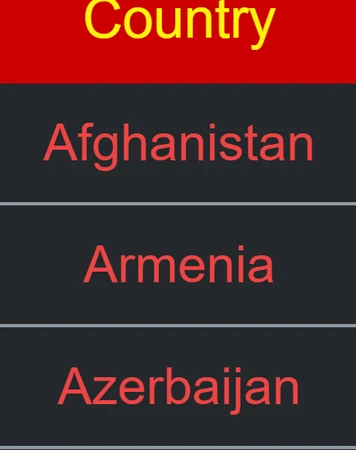
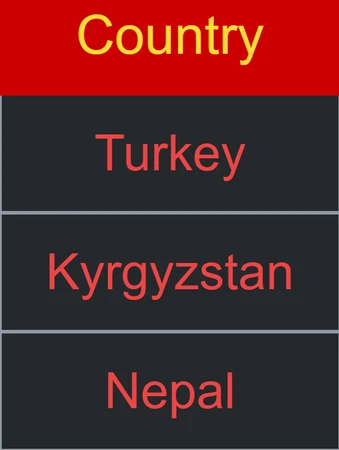
The only exception for why you shouldn't organize is because it may reveal answers (for example, if I typed 'Albania' and it appeared in the second row, I automatically know Afghanistan could be an answer). However, this is usually not much of an issue.
#34: Make two answer columns. In a quiz such as Richest Countries Bordering Each Other, making two answer columns is a great way to organize the quiz versus merging cells or leaving them all separated:
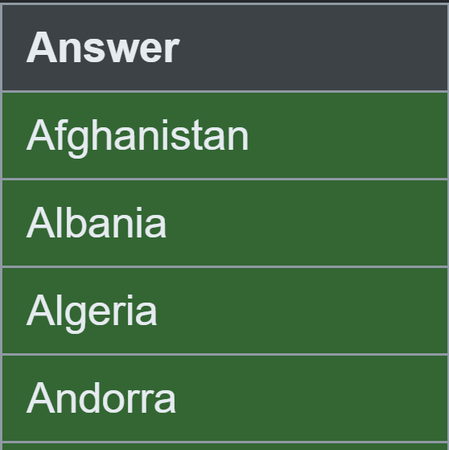
#1: Get all of your answers in Step 2.
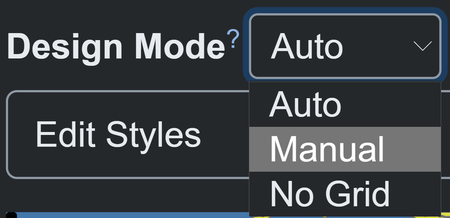
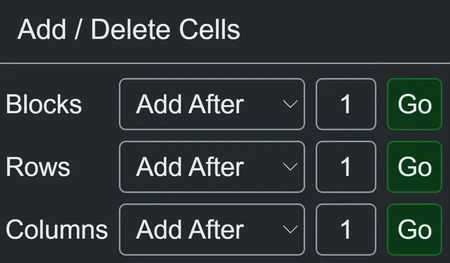
#3: Add as many columns as you wish.
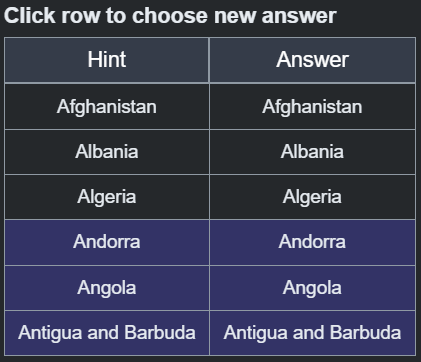
#4: Go to 'manual cell options' and select answer. From here, choose your answers for each box!
And just like that, you have two answer columns.
Generating Ideas
#35: Stare at the clouds. If you want ideas, actually try to think of ideas rather than letter them pop into your head. One way I like to think of ideas is to look at the clouds. The 'that looks like a shoe' cloud will soon become a JetPunk quiz one day.
#36: Stare at your TV. Similar to looking at the clouds, and maybe more interesting, is trying to think up ideas while watching a movie or TV show. I find this also works quite well, especially as changing scenes add more ideas to the mind.
#37: Play with words. Simply reading a list of metaphors or messing around with words is a great way to come up with quiz ideas. Take the quiz Sudden Death - Sudden Death as an example.
#38: Blend quizzes together. If done well enough, you can get some neat ideas from simply mixing two quiz ideas together (not everything will work, of course. Please don't combine First-Level Subdivisions of Asia and Concentric Countries Around France to make 'Concentric First-Level Subdivisions of Asia Around France'.)
#39: Make connections. Two completely random things put together can make for a great quiz idea. I'll make something up right now: keyboards and minesweeper. Ooh, keyboard minesweeper seems like a good idea...
You get the point.
#40: Constraints. The ways you can limit yourself are endless. And it may not be good to limit yourself in life, but it can be good in a JetPunk quiz! Say, three syllables, three colors, or three years. And with the endless categories of words, countries, flags, shapes, elements...that's plently of ideas there.
Outro
Well, that concludes my blog celebrating all 60,000 takes. If every person who has taken one of my quizzes played it for just one minute, that's over 900 hours of staring at my quizzes. That's a lot of time.
This blog is also very special - it's the 10 thousandth blog created on JetPunk! You can tell by the number in the URL, though you can't see it. Would've been a nice touch for 10,000 takes, but we are well past that.
Anyway, here's to another 10,000 blogs and another 60,000 takes!
Nice ideas! My least-taken quiz looks horrible, so...
I think this shall go into the Useful Links, eh?
Congrats on 60k!
Edit: (also congrats on milestone lol)
Well done and thanks for the tips!
w(°o°)w
I don't understand. This is too much for my 4 brain cells to understand...
.0.
FELIZ NAVIDAD!
:p
Or a reincarnation of Astana
(On 80 000 takes)
And great blog btw
And Happy Christmas !