
JetPunk Magazine - Spring 2026
First published: Saturday April 18th, 2026
Report this blog
- Welcome Back
- Word Search Overhaul
- The Basics
- How Word Searches Work
- Creating a Puzzle
- Mega Puzzles
- Small New Features List
- Pie Charts
- Multiple Answers for Picture Quizzes
- Picture Feature for Sudden Death
- Miscellaneous
- JetPunk Site Updates
- New Login Information
- New Capital City
- New Minigame - Typing Speed Test
- Premium Giveaways!
- Quizmaster Queries
- User Spotlight Surprise
- Customized Jeppy Profile Picture Display Reminder
- User Quiz Spotlights
- Quiz Advertisement Selection
- Conclusion
Welcome Back
Hello, readers. Welcome back to the JetPunk Magazine. In this blog, I report on all the biggest happenings on the site, from new features to cool stories and everything in between. This edition saw many new additions to the site, some small and some large, all being quite interesting and unique.
Check out this Magazine edition to read a brief section about our Backstory if you want (the first article). It will describe how the Magazine started and where it is now.
Anyhow, I'm sure you're ready to get into it. Thanks for stopping by, now sit back, relax, and enjoy the JetPunk Magazine!
Word Search Overhaul
On February 8th of this year, JetPunk moderator Stewart gave us probably one of the biggest updates to date on the site, rivaling that of the new Front Page, Message Board, Sudden Death, or even Blogging. You can now create your very own Word Search Puzzle! Prior to this update, word searches were a tiny portion of the overall site, where Stewart was the only person who could make them. They didn't contribute to much besides being something else to do in your spare time, but now, word searches are so much more. Let's take a look at what all has changed.
User MasterRocket has created a lovely blog about how to make better word searches. Go read this as well to get a deeper understanding, as I will likely mention this blog often throughout the article.
The Basics
We'll start off small. Every word search now has a comments section. Before, as you can assume, this wasn't the case. Now, users can leave their thoughts, from a simple compliment to a suggestion or perhaps correcting a mistake that the creator might have overlooked. These comments work the same as those on quizzes, so not much to discuss here over than that they're a new addition.
Word Searches can also be searched for directly in the search bar. That's a lot of searches. You better get searching for the Word Searches or else you'll be stuck here forever hearing me say search. Search search search. Okay sorry, I had to. Anyways, where was I? Oh yes, now, whenever you type in a keyword into the search bar up top, user puzzles will also be provided in addition to the quizzes, users, and tags already available. This will certainly help in finding a specific puzzle you want to take, and provides a method of attraction for the new feature as a whole.
Puzzles can now be featured as well. Just like quizzes with the Quizmaster, the "Puzzlemaster," being Stewart, controls the Word Search section, deciding which puzzles to feature, moderating which puzzles are good and bad, and everything in between. Each user has their own Summary table for their puzzles section, displaying the puzzles created, total puzzle takes, and total subscribers (which would be the same as on quizzes). If the user has a featured puzzle, then that is also displayed. Likewise to quizzes, a new featured puzzle is displayed on the Front Page every day, where it can accumulate more takes. Whenever Stewart features a new puzzle, you will get a notification. If it's your puzzle, then you will also receive a message from Stewart letting you know that your puzzle was featured. You can manage word search notifications directly in your notification settings, turning on/off the notices for featured puzzles as well as the Daily Word Search.
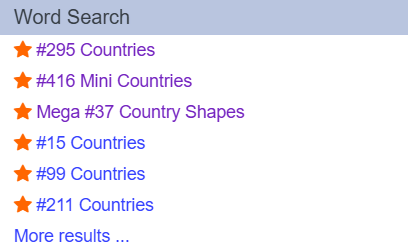
As stated above, Puzzles have their own section in the search menu just as Quizzes, Users, and Tags do. Featured Puzzles will appear on top of non-featured puzzles, but if your key word(s) do not correspond to any featured puzzles, then non-featured puzzles can appear on top. Clicking "More results ..." brings you to all puzzles with said key word(s). As you can also see, Regular and Mega puzzles will both appear in this section.
How Word Searches Work
Word Searches now have their own section in the drop down menu. By going to this section, you can find Featured Puzzles, Recent User Puzzles, and the option to "Create Word Search." The featured puzzles include everything Stewart has created, plus community puzzles which Stewart likes and decides to feature. It also includes the Mega Puzzles, and Stewart can feature these too. More on Mega Puzzles later. Recent User Puzzles are every puzzle created by the userbase. Once a puzzle gets featured, it no longer appears in this section. Finally, you can now create your own word search!
Creating a Puzzle
To create a puzzle, you can go to the "Create Word Search" option in the drop down menu, find the same option under your person icon in the top right, or click "Create" up top. Word Searches appear as an "Other" option, so click that drop down to find it.
Creating a puzzle is relatively simple, so let's thank Stewart on that front. You might not even need to read this article to understand how it's done. If you have created word searches before, then those are displayed for you to see, edit, copy, or delete. Note that any featured puzzle can not be deleted by the original creator; only Stewart has that ability for obvious reasons.
Clicking on the blue "Create New Puzzle" box will take you where you need to be. The layout is easy to understand, but I'll break it down. You have the "Theme," or the title, and the puzzle description. Easy so far. Then you have the Shape and Size of the puzzle. The Shape can either be a standard square or the unique honeycomb. As MasterRocket explains in his blog, square grids are usually best since they allow for four set directions whereas the honeycomb only has three (no vertical). Honeycombs can be useful for grids with some larger words that would not sit ideally in the square gird. However, honeycombs are still a fun and different shape to play around with. The Size of the grid is clear; you have a range from 7x7 to 25x25 grids, but smaller, more dense girds are usually better.
Note that the honeycomb shape can only have an odd numbered height due to math, or something.
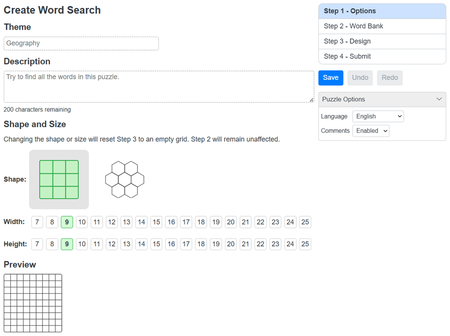
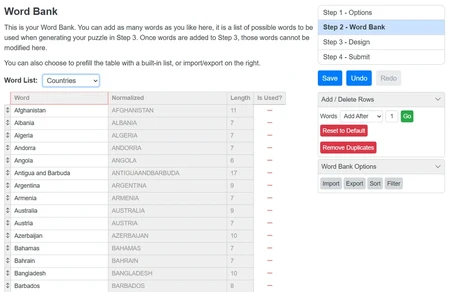
That's Step 1. Step 2 is choosing your word bank. You can create your own bank of words or choose from a pre-existing custom set already coded into this Step. This set has countries, capitals, easy words, and more. However, try to be unique with what words you use. Having a bunch of words in this bank is useful as many of these words may not be able to work in your grid. More below. Also make sure to take note of the word lengths and what letters comprise these words, as this will be useful when you design the grid in the next step.
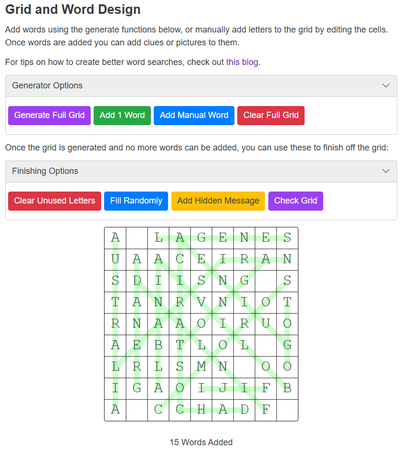
Step 3 is where it gets real. This is the place to design your grid however you like. You can either manually input words into the grid, or have it auto generate for you. Not every word may be generated, or be able to fill the grid in general. This is why having a plentiful amount of words in the bank is useful as the code (or yourself) has more options to choose from. Words that are used in the puzzle will have a green line through them. You can change the opacity of this green line if you wish.
If you decide to add words yourself, you can do so one at a time by clicking the green "Add 1 Word" button, or by manually typing in each letter into the cells. You can also add a manual word (blue button) to append a word to the bottom of the word bank in Step 2, which will then appear in the grid.
If you don't like the grid design, you can press the red "Clear Full Grid" button to remove all words and start over, perhaps using the purple "Generate Full Grid" button instead. Each button is a different color so you can see their differences.
You can also set the word directions. "All" directions is the default, but if you only want horizontal words, you can certainly do that. You can disable backwards words and prioritize longer words to be used first in the grid.
Once you're satisfied with the word layout, you must fill the remaining cells with letters. You can do this manually as well, or have it auto generate. You can also add a Hidden Message with the yellow button, allowing you to type a phrase which will be visible when a user completes the puzzle.
After this, you should check the grid. There is a button to make sure that all words in the list below the puzzle are actually in the puzzle and not left out. Remember that not very word in Step 2 has to be used, but if a word is in the list below the puzzle, it must be in the puzzle or removed manually. The grid will automatically check for duplicate words (a red line will clearly show these).
Now, make the word list under the puzzle look nice. You can sort them in many different ways, such as alphabetically, by length, and more. You can change the number of columns as well (mobile is auto set for you, or you can change it).
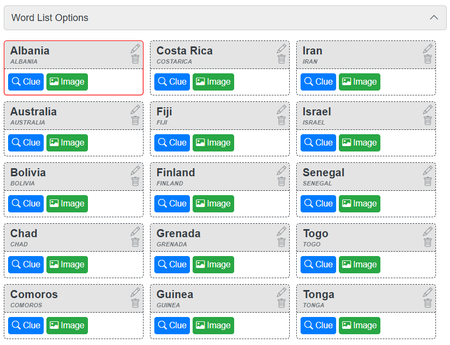
There are also options for the word list. I'll list them out here:
- Words can be replaced with images that the user must decipher and then find the word they think it is in the puzzle.
- You can add clues to the words which the user needs to decipher.
- You can hide the word list where the only hint is the letters that the words begin with.
- Not to be confused with the above, you can also have each word be set to "First Letter Only" where every word has its first letter visible.
- You can have the first letter visible as well as the length of the word.
- You can set every word to have missing letters.
For all of these, the word will be revealed once it's found in the puzzle. For images, you can set the border width and upload images the same way as for quizzes. You can clear all clues and/or images with the press of a button, all of which is very easy to find on the actual Design page.
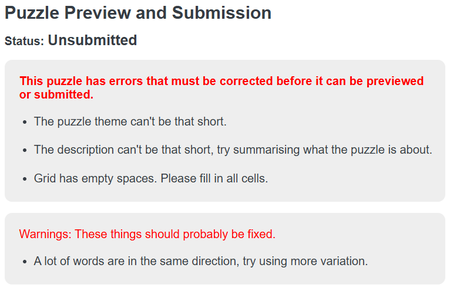
Once all of this is complete the way you like, Step 4 is the submit. The first few puzzles you submit will be manually checked by Stewart before going live, but after this you have free range. You can only post five per 24 hour period, and this refreshes just like for quizzes. If you have any errors, these will also appear in Step 4. The code also leaves suggestions, for example if you don't have many words that intersect, the code will suggest you change this. Nothing to fret over though, but these suggestions could help you secure a featured puzzle.
That's really all there is to it. I highly recommend reading Rocket's blog on Word Searches as well to get a bit more of an in-depth recap. It's linked above and can also be found in Step 3. Rocket makes a lot of good Word Searches too, so make sure to check them out. If you follow his guide, you too can get a featured puzzle!
Mega Puzzles
JetPunk has Regular puzzles and Mega puzzles. There isn't much to say here besides mentioning that they exist and can also be featured. While you can create large-scale puzzles (up to 25x25), you cannot actually call your puzzle "Mega ____" in uniform with all the other featured Mega puzzles since putting "Mega" at the beginning of your title isn't possible. However, there is nothing stopping you from making a large-scale puzzle; just think of a good name and maybe Stewart will feature it.
Small New Features List
Just like always, JetPunk received some small new features, and a plentiful amount at that. Let's thank Quizmaster and Stewart for these spectacular new additions, all of which make the site that much better. I'll go through each feature and explain anything that needs to be explained.
Pie Charts
Along with the Line and Bar Charts we already have, Pie Charts are here to offer new visuals to our data. The concept is clear, so I don't think there's much to explain here. This type of chart works similarly to the others, but with some additions. The data input doesn't change, rather how the data is displayed.
You can customize the height and width of the pie, the color of each sector, legend position, and the pie shape (being either a full pie, donut hole, or 3-dimensional figuration). You have the option to reset the color scheme if you wish or individually change each color yourself.
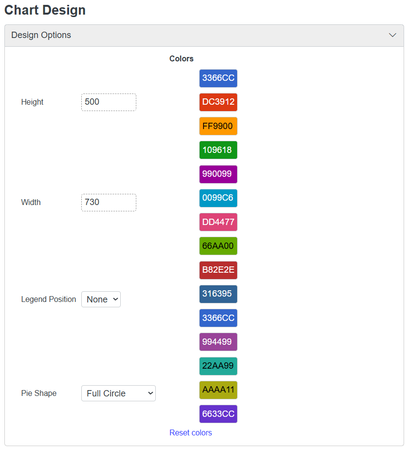
Now, instead of just some lines or bars, we get a pie! Being easy to read and create, I feel like this type of chart will eventually become popular on the site. Below are some new Pie Charts to check out and perhaps get some inspiration from, or just admire.
- Message Board Likes vs. Comments - March 2026 - by akjlddkjslfsd
- World Population by Continent (2026) - by Elboy
- Maxibon's Quiz Format Distribution - by Maxibon
- Greek Takes by User - by MasterRocket
- Pyramid composition - by BautyArg
Multiple Answers for Picture Quizzes
Picture quizzes got an update as well. Nothing major, but a useful update that will yield, and has already yielded, new and unique quizzes. Now, you have the ability to add multiple answer boxes per each picture. What this does is allows each picture to have up to three, yes only up to three, answers instead of the normal one.
While there are still methods of achieving multiple answers in a singular box, the "Answers per Picture" (option on the right side of the "Design" module) not only functions easier for the creator, but also looks nicer for the quiz taker. Applying this option is uniform for all pictures, meaning that every picture will either have one answer box, two, or three.
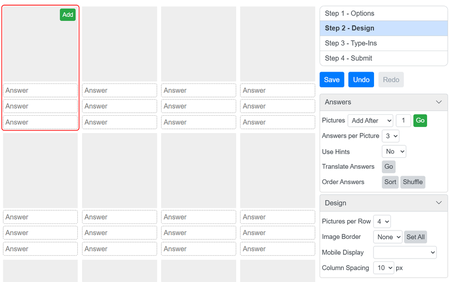
Here are some quizzes made by users taking advantage of this new formatting design:
- Countries by Half-and-Half Images - by Dug28
- Recognize Countries by Tripoint Maps #1 - by KoljiVriVoda
- Famous Duos by Picture #1 - by Elboy
- Flags With Logos - by McKenzieFam
- Flag to most populous cities - by BautyArg
Picture Feature for Sudden Death
Sudden Death also got a little boost. Now, you can add pictures to your quizzes! Well... adding pictures isn't a new feature. However, Quizmaster gave us an easier method to do so. Before, creators had to add pictures to their Sudden Death quizzes using HTML formatting. That took a while and could easily be messed up. Thankfully, we now have a simpler way to go about implementing images.
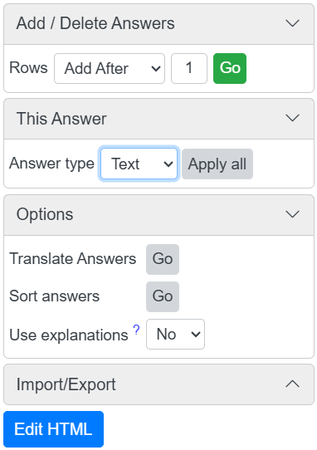
On the right side of your Sudden Death quiz, in Step 2 - Answers, you'll see the section "This Answer." You can toggle that button on and off for each individual answer box, making it either a Text cell or an Image cell, but not both at the same time. (Note: if you want to have an image and text in the same cell, you must use HTML for this). By selecting the "Apply all" option, every answer cell will become the set option.
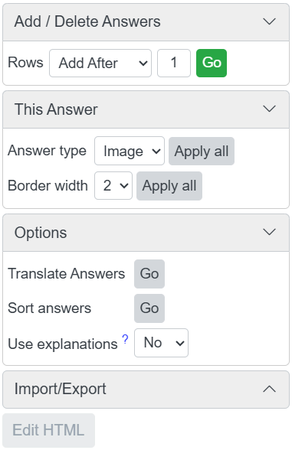
Applying the Images feature also allows you to set a border width from 0 up to 3, with the default being 2. You can also apply this to every cell with the click of a button. A useful change for Sudden Death, making it easier for all users alike to add images into their quizzes.
Miscellaneous
There are some very small new features that I do not feel the need to go in depth about, so here they are (implemented by Stewart):
- Notification when a Word Search Puzzle is featured.
- Ability to set the zoom level of an SVG map.
- Ability to translate answers in Click and Sudden Death quizzes.
All very useful of course. Much thanks to Stewart!
JetPunk Site Updates
Along with the small new features, JetPunk itself had a few updates. Not much to explain, but I'll list them individually below with an explanation.
New Login Information
For security purposes, JetPunk changed the way users log into the site. Instead of logging in directly within JetPunk, now there is a separate, individual page where you log in before interacting with the site. Again, for security purposes, and it honestly looks better this way.
If you stay logged in, this won't really effect you much; but when you do log out, don't be jumpscared.
New Capital City
On January 2nd of this year, Equatorial Guinea moved its capital city from Malabo to Ciudad de la Paz. This shift was pretty notable, especially on JetPunk, because it doesn't happen very often. The last finalized instance of a moved capital city was Myanmar's shift from Yangon to Naypyidaw in 2005. This didn't really do much for the country, but maybe Equatorial Guinea will make more of this change.
Other countries have also moved their capitals in recent times, like Brazil, Nigeria, and whatever Indonesia is up to. So, this is pretty interesting. No longer do we have an island capital, but this is likely for the better for Equatorial Guinea; Bioko was pretty far away from the mainland part of the country.
Many quizzes in JetPunk got updated for this change. Thankfully Quizmaster didn't reset points for most besides the quizzes where this change actually did alter the quiz statistics. Since the change took a few weeks to be secured, JetPunk also took a few weeks to secure all of these quizzes changes, with Quizmaster stating "I'll give it a week or so and see how this develops" (January 4) due to Indonesia's Nusantara incident a few years back which sparked a bit of chaos through preemptive quiz changes. Wikipedia was not completely sure either, thus validating the slow updates. However, the quiz edits began on January 12th (comments), and it's been three months since.
Quizmaster also provided a spreadsheet of other featured languages where Malabo was an answer, allowing for translators to update quizzes in other languages with ease. See the link above.
New Minigame - Typing Speed Test
Along with these small new features is a nice minigame to add some more life to JetPunk. Created by Quizmaster and posted on February 11, the minigame, being a Typing Speed Test, gives users the chance to improve their typing skills for a better time on the Countries of the World Quiz, or other lame activities like writing an essay.
It can be found in the Badges and Games section under the Menu along with all the other minigames. You are given a description of how the typing test operates with four main bullet points as seen below.
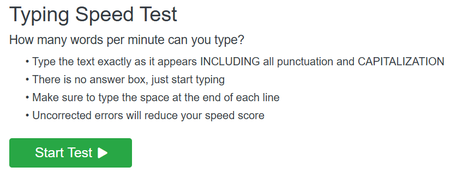
Once you press start, you have a full minute to type as many words as you can. According to Quizmaster, there are 650 different AI generated paragraphs you can get, being randomly assigned to you for each playthrough. Quizmaster also states "We follow the convention that 1 "word" = 5 keystrokes, including spaces and punctuation." So, this test is just the average typing test, rather applied directly into JetPunk to attract more users, and to let users pass the time in an enjoyable fashion.
"It's so fast. There's no lag of any kind, making it superior to most speed type tests on the web."
Once you complete the full minute run, you receive a "stats" page of sorts, displaying the information for your run along with stored data from previous attempts. It looks like this:
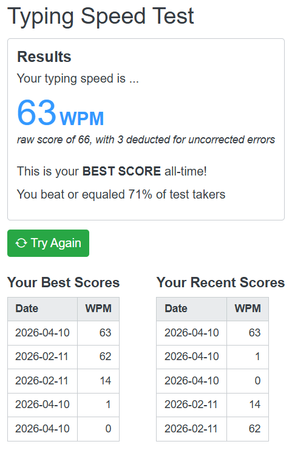
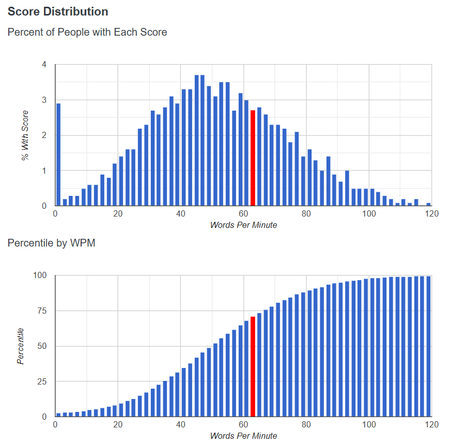
Your Words Per Minute is the main focus, with other useful stats on how you did. You also get graphs for the score distribution from other users, being the percent of people with each score, and the percentile by WPM, as seen above.
The new minigame has received loads of positive feedback, as well as a few critiques here and there. Some questioned the spacing between letters, but Quizmaster states it's best. Some questioned the AI usage, but Quizmaster states this minigame would not have been possible without AI's assistance. Ultimately, the reviews are net positive, and it's clear why!
One point to note is that this minigame is only playable on desktop versions of JetPunk for the functionality aspect. No need to complain about this though. If you want to reach 100 WPM, a keyboard is bound to be a more useful device.
Go try out this minigame for yourself and see what you think. Can you beat my sad little score?
Premium Giveaways!
On March 24th, we received quite the wonderful surprise from Quizmaster: Premium giveaways! If you don't know, Premium is a feature of JetPunk which gives users an improved experience on the site, mainly removing all advertisements, providing real-time quiz analytics, and gaining the quiz tagging ability. This advanced feature does cost money depending on how long you want it for, and multitudes of users contribute their share, buying six month, one year, or three year Premiums.
Before this grand giveaway, the only ways to obtain Premium were by purchasing it yourself or being gifted it by another JetPunk user (an amazing feature in my opinion). However, this has since changed.
Now, any JetPunk user has the chance to get a taste of Premium. Quizmaster coded in three new ways to achieve this status, being:
- If your quiz gets featured in English you get three free months.
- If your quiz gets spotlighted you get one free month (as well as the user who spotlighted your quiz).
- If you extend your streak, you get the chance to earn one free month (50 random giveaways per day).
Note that if you decide to spotlight yourself in hopes of two free months, this will not work. Spotlighting yourself only provides one free month for you.
You can receive infinitely many Premium giveaways. If you continuously get your quizzes featured in English, then you will also get Premium alongside it. This might encourage users to create higher-quality quizzes, and if not, then encourage them to stay on the site and extend their streak.
There are some questions that arise with this implementation. Since Premium is not a massive sector of income for JetPunk, how will free giveaways impact Premium as a whole? Will it encourage users to buy more Premium to get that upper class feel on the site? Only time will tell. As for now, go extend your streak! You might be lucky...
Quizmaster Queries
In the time that I've been somewhat procrastinating this blog and dealing with life things, Quizmaster brought up two interesting questions to the Message Board which I should address here.
Firstly, "Should I change how points work?" was posted on March 12th and discusses the idea of revamping the JetPunk points system entirely. The community left their comments on the matter, and ultimately no change was made at the time. Will a change arise? We'll have to wait and see. Read the post for more details and explore what others think.
Secondly, "Badge revamp project?" was posted on March 13th, one day after the other. This thread raises the idea of changing how badges operate, possibly changing it for more user contribution. Nothing has come of this post either just yet, but I'm optimistic that JetPunk might have more in stock.
User Spotlight Surprise
In the last episode of the Magazine, we saw user KiloNova receive the User Spotlight Surprise for his excellent quizzes and contribution. I've given Kilo the option to select our next user Spotlight to create a chain that isn't just my doing but community involvement. Let's see who Kilo chose.
Third Spotlight: Lindwyrm's Quizzes
Lindwyrm is a prominent user in the community, creating multitudes of quizzes regularly. Being on the site for only a year, Lindwyrm has accumulated 50,000 takes with 400 quizzes. With 11 features to their name, they sit just outside the top 1,000 quizmakers as of posting this blog. Even though Lind's most taken feature has less than 3,000 takes, the features aren't everything that makes Lind worth spotlighting. Let's dive in.
Lindwyrm has 11 featured quizzes, but none of them are English. Instead, Lind has worked in other languages to gain these takes, namely French, German, and Spanish. Of course Lind also has English quizzes, but it's these other languages that boost the playing field. Six of Lind's seven most taken quizzes all comprise the series Choix multiples, a French series dedicated to the Multiple Choice City Quiz Project from last year. Go read about this in my previous Magazines. Well, around 15,000 of Lind's takes are from this series alone, with seven of the ten quizzes in this series being featured. That's some good work.
However, this is Lind's second most taken series. Their most taken is Historical Maps Quizzes, and it's clear as to why. Comprising over 100 quizzes (137 to be exact), this series is massive. Each quiz uses an SVG and is delicately handcrafted into something spectacular and utterly beautiful. A lot of these maps are simple, while others are true masterpieces that go under the radar for most of JetPunk. For example: All Subdivisions of the Soviet Union on a Map. Amazing, or perhaps this: Territories controlled by Nazi Germany in 1942 on a Map. I could go on and on about the craftsmanship each quiz is subjected to, but we would be here a while. Lind also has some lovely City Maps and even Fantasy Maps for all kinds of users to enjoy. Safe to say that you should try out some of these maps for yourself!
Overall, it's safe to say that Lindwyrm is a Hidden Gem. In fact, I even made a blog about this. Now we know that it isn't just myself who thinks so, members of the community recognize Lind's efforts and believe that more attention should be given to such an underrated quizmaker. While their account is only a year old, the quality of Lind's quizzes is nothing to overlook.
Thanks to Lind for making some outstanding quizzes!
This spotlight isn't meant to make anyone feel bad. If you do feel bad that you didn't get a spotlight, please do not feel this way. I love highlighting users who do great things on JetPunk. If I highlighted every user who did great things on JetPunk, the Magazine would surpass the maximum word count limit. I want to display individual users for the things they bring to the site. If you think this is you, then be patient, and maybe I will pick you too. Until then, let's all thank Lindwyrm for their amazing quizzes!
Customized Jeppy Profile Picture Display Reminder
Here is your reminder. I know you forgot. Do you still like your Jeppy?
If you have no idea what I'm talking about, check out this blog with all the details. You can request your own Custom Jeppy in the comments of that blog, and I'll be more than happy to make you one! You can find your, and other, Customized Jeppies here!
User Quiz Spotlights
Idea and quizzes provided by MeMeMe333
Country Shape Mash - Whammies - by Lexiconic
Reveal the Answers - Sudden Death - by KiloNova
Click The Color Wheel #1 - by KiloNova
Imposter Flags Among Us! - by SonyVondern
Flags with Helium - by Capybarra
Bible General Knowledge #1 - by MeMeMe333
Biblical Groups of Four - by JetPunkium
Flags but [with] People - by Anonymousbeer25
Legends and Myths of Europe on a Map - by Maxibon
All Subdivisions of the Soviet Union on a Map - by Lindwyrm
European Countries in Dots - by Geordy
Codeword Puzzle #1 - Map Quiz - by Stewart
Five Countries with the Most JetPunk Users by Continent - by Stewart
Countries Without Concave Angles #1 - by CommanderPro
Europe Jigsaw Puzzle - by Dimby
Peninsulas Revealing Peninsulas - by Maxibon
Much thanks to MeMeMe333 for finding and selecting these quizzes for the spotlight. These quizzes are from users in the community as well as lesser known users. Consider taking these fabulous quizzes! They might be Featured one day...
Quiz Advertisement Selection
Quizzes Selected by Pontiac's Quiz Advertisement Group
January, February, and March brought many quizzes to the Quiz Advertisement Group! Four were chosen each month this time because one of our mods became inactive for some reason and didn't choose a quiz to spotlight. But that didn't stop us from choosing some of the amazing quizzes that were spotlighted!
January's Selected:
- Organelles of a Cell Map Quiz - By Pinoccio
- The Border Maze - By Lexiconic
- 20 hidden Countries World Map - By Mirko86
- Blended Flags - By lingonax
February's Selected:
- Name the First Level Subdivision and Country - By HubertThePhoenix
- Click the Tri-State Border on a US Map - By KiloNova
- Guess the Mystery Country By Directional Clues - By KiloNova
- State Capitals with the Lowest Population Rank in their State - By sacheth9
- The Jeppy of Countries - By LuckyCat
March's Selected:
- Flags of Territories of the World - by Monzal
- Europe Jigsaw Puzzle - by Dimby
- Easy Bible A-Z - by MeMeMe333
- Capitals Closets to the Center of the Map - by GeoPhilia
Thank you all for your amazing quizzes! These were the selected quizzes from the QAG Mods (Ptcairn, LuckyCat, MeMeMe333, heyitsRen, and Pontiac). We look forward to advertising more quizzes later!
To join the Quiz Advertisement Group, accept the invite here!
Much thanks to Pontiac for his own advertisement article. These quizzes have been chosen for highlighting, and more will be selected in the months and Magazines to come. As for now, go take some of these quizzes, and maybe even nominate them.
Conclusion
Last edition was the longest to date with 40k characters. This one reached 30k, yet I still feel like there was a lot of information to cover. I'm happy with how it turned out even though I felt a bit more rushed or compressed with school and such. Sorry for the delay, but it's here now and just as healthy.
If you wish to write an article entry of your own, make a blog and collab it with me. I would appreciate this help, since I can't always think of much to say on my own (again I was spoonfed topics, I'm quite happy honestly). I'm glad Astana let me continue this tiny portion of her legacy, it really means a lot to me. Don't forget to thank Astana in the comments! Again, if you don't know who Astana was, go read the previous Magazine edition for all the lore.
Thank you for reading, and I hope our community can continue to grow. See you soon.
- Lucky
Also, "Blended Flags" was made by lingonax, not me
I just copy and pasted that whole articleI'll fix thatThank Kilo for the spotlight, it was a pass off ;)
Hopefully I'll write my own section in the next edition, I have quite a good idea.
(also 'one of our mods became inactive for some reason' really got me haha)