
JetPunk Magazine - Winter 2025
First published: Sunday January 4th, 2026
Report this blog
- Welcome Back
- New Quiz Challenge Feature
- Daily Archive After Quizzes
- Small Quiz Updates
- SVG Update
- New JetPunk Languages
- User Spotlight Surprise
- Customized Jeppy Profile Picture Display Reminder
- The Return of the JetPunk Poem Promenade
- The Art of Misinterpreting
- User Quiz Spotlights
- Quiz Advertisement Selection
- Conclusion
Welcome Back
Hello, readers. Welcome back to the JetPunk Magazine. In this blog, I report on all the biggest happenings on the site, from new features to cool stories and everything in between. I'm happy to report that this edition also saw much user contribution, so thanks to those who took some time to write an article. It also saw many new additions to the site, some small and some large.
Check out this Magazine edition to read a brief section about our Backstory if you want (the first article). It will describe how the Magazine started and where it is now. This article will also be useful to read if you are confused about who Astana is, or was.
Anyhow, I'm sure you're ready to get into it. Thanks for stopping by, now sit back, relax, and enjoy the JetPunk Magazine!
New Quiz Challenge Feature
On November 3rd, Quizmaster rolled out a brand new addition to the site called the "Challenge Friends" feature. This feature is just what it sounds like; you can now challenge other JetPunk users to a quiz after you complete it. The link above leads to the original thread by Quizmaster, as he briefly explains it there. However, I'll tell you everything you need to know about this new feature!
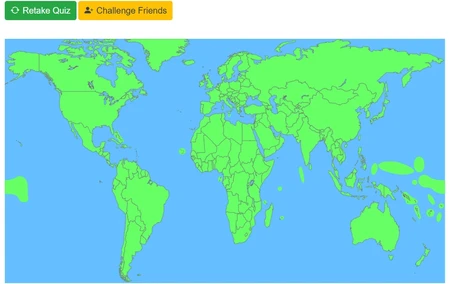
After you complete any quiz on the site, you have the option to "Challenge Friends". This button is a gold color (in the thread it says blue, but was changed to stand out) and is located next to the "Retake Quiz" button, being easy to find. Once you click the button, you can create a quiz challenge.
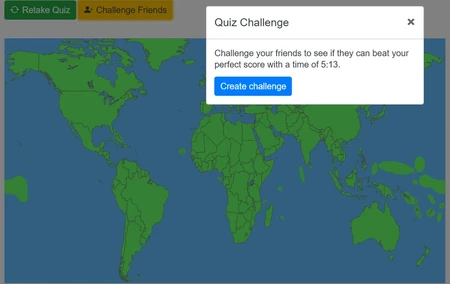
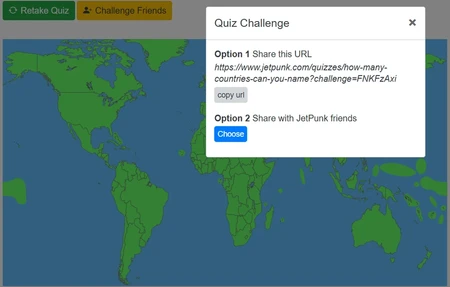
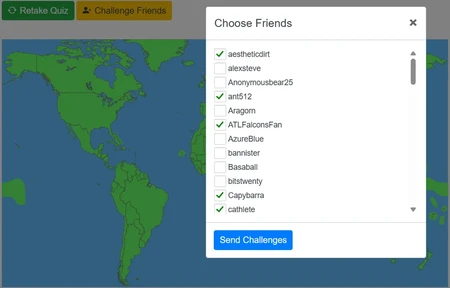
You are then presented two options. Option 1 is sharing the quiz URL. This allows you to copy the challenge link and share the quiz with anyone you want! It can be your JetPunk friends, random users, or even people who use Sporcle. Anyone with the shared link can take your Quiz Challenge. Option 2 is simply sharing with your JetPunk friends. By selecting the blue "Choose" button, your friends list opens up and you can then individually select all the friends you want to share the quiz with. There is no "select all" option on purpose. It is to prevent spamming challenges and being annoying, a good decision on Quizmaster's part.
Once you Send the challenge, the users who you sent it to will be notified on JetPunk (if they either received a friend's challenge or clicked a challenge link on the site. If you shared the link outside of JetPunk, then this person will simply be taken to the quiz). Then, when the user begins the quiz, the Challenge will begin!
Here is a visual representation of the order described above. Pictures are numbered in order.
Sending Challenges
The goal of a challenge depends on how well you do on the quiz. If you score a 100% and want to challenge your friends, then your friends' goal is to beat whatever time you got on the quiz, as well as getting a perfect score. For example, say you got that 100% in 30 seconds. Your friends' goal is to beat that time while also getting 100%. If they do, then they win the challenge. If they tie your time and get 100%, then they don't win! If they do worse, then they obviously don't win either.
Let's say you only miss one question and the time runs out (or you give up), but still want to challenge your friends. Your friends' goal now is to beat your score by getting 100%. If they do this, then they automatically win the challenge whether or not they took longer to do so. When the user is taking the quiz, they will have a guide telling them how many more answers they need to guess before they complete the challenge.
Users can attempt your challenges more than once. However, the challenge message will only appear when the user clicks on the specific notification. Either way, whenever the user takes a quiz you have challenged them, their results will appear in your challenge log, only visible by you.
Receiving Challenges
If you're on the receiving end of a challenge, you will get a notification on the bell. Depending on how well the user did on the quiz they're challenging you to, the message will say two different things. If the user got a perfect score, the notification will read:
"Quiz challenge from [User]
Can you beat their time of ____?
[Quiz link here]"
It is implied that the user got a perfect score on the quiz, so it's your goal to beat their time instead. Once you click the link, the message will appear at the top of the screen, including a few more specific words like "perfect" for score so you understand.
If the user issued the challenge but missed a question, then the notification will read:
"Quiz challenge from [User]
Can you beat their score of ___ correct?
[Quiz link here]"
It is now implied that the user missed at least one question, and you need to get a better score to win the challenge, no matter the time it takes you.
When taking a challenge, you will see two messages. One will show if the sender got a perfect score. It will read "Finish before _:__ to beat the challenge". If you beat this score, the text "YOU WIN!" will be displayed after the quiz ends, and your score will be, as well as a little box that has your score and your opponent's score, comparing what you and your opponent got. This box and message will be removed from the screen when you leave or refresh the page. If you don't beat your opponent's score, then nothing will appear.
The other message will be "Get __ more correct to beat the challenge!" This message will show if the sender missed at least one question. It will automatically count down after every question you get right, letting you know how many more questions you need to get right to beat the challenge. If you beat the challenge, the same little box will appear with your score and your opponent's score. If you fail the challenge, nothing will show.
You are also able to disable the notifications if you so please. Simply go to your "Manage Notifications" tab and the options will be there. They are called "Quiz challenge received" and Quiz challenge results (from friends)". Simply uncheck these boxes to disable the notifications.
Your Challenges
Quizmaster rolled out a new page under your User Profile (the person icon in the top right) called "Your Challenges". When you click on the person, it is the fifth option down, and fifth option up, set snug in the middle. By clicking this, it takes you to every challenge you have sent or received. However, for page reduction, only the top five most recent challenges in each section are displayed. You can see every other challenge by clicking the little "Show all >" link under each section.
In this page, there's not a lot of complexity. Challenges you have issued will "expire", or be deleted, after 90 days of no activity from any user you sent the challenge to. Each challenge has its own little box filled with all the information you need, being the Quiz Link, Date of Issuance, Score (and time if perfect score), and Challenge Results. The results are another link, taking you to another page specifically for that quiz challenge. It shows every user's results on the challenge compared to what you got.
For each challenge box, there are two more options in the top right (three vertical dots). These are "Get invite URL" in a blue box, and "Delete challenge" in a red box. These allow you to invite more users to your challenge, and delete a challenge you issued respectively.
Before the feature was finalized, there was no way to check what challenges you had received besides going directly to your notifications. This had been fixed, and is no longer the case of course. See this thread from the Quizmaster himself.
The pages are very organized, allowing any user to easily understand all there is to know about challenges.
Where's the Share?
If you're a veteran user of the site, or just a user whose account is older than two months, you might recall the "Share Results" feature after completing a quiz. It was located in the same spot as the "Challenge Friends" button is now, meaning that yes, the Share feature is no longer an option.
This doesn't mean that you can't share your results anymore. The button was simply replaced. "Why?" you might ask. Well, that I do not know. I would provide some theories but don't want to spread false information. The Share feature was a prominent part of a quiz, allowing users to easily copy the quiz's data and distribute their results elsewhere. This allowed for people to reach out to others to either brag, compare, or even challenge. Now, these possibilities have been limited to just challenging, which really got an upgrade.
Sharing also gave users the chance to bring non-users to the site through advertising quizzes. This might have increased traffic, although I cannot say for sure. However, the button has been removed. So, what if you want to share your quiz results?
Well, you can still copy your quiz results. When the quiz ends, you'll see the box called "Scoring". In the top right of this box is the option to copy your quiz results. This allows you to still share how you did on a quiz. While it isn't direct, it's still a sharing feature, albeit much more subtle.
The removal of this button led to some interesting feedback in the thread by Quizmaster first addressing the addition. Mostly positive of course, the active userbase saw the challenges feature as a benefit to the site. However, many of these users are not of the age to remember or actively use the "Share Results" feature. Speaking from personal experience, I myself never used the share feature much at all. Although, I know many other users did, namely but not limited to those who participate on the JetPunk Discord. The feature was still part of JetPunk, and some are not thrilled about its replacement.
"As I’m happy for the new feature, I’m annoyed about the removal of share results, not every time I get a score in a quiz I want someone to try to beat it when I show it to them. Both of these features should co-exist and the removal of share results is annoying enough for me to decrease my activity on the site as I think my friends would share results more often resulting in me clicking the quiz and taking it, than they will challenge me. It’s just some data that gets pasted into the clipboard, why did it have to be deleted."
As user ant512 states, there is nothing negative about the new Challenge Friends feature. However, removing the Share Results option seemed unnecessary. While we are still able to copy the results, it's not what it used to be. However, it seems that there was more good from this implementation than bad, which is what counts. This addition to the site is fantastic, so let's thank Quizmaster for it!
Special Thanks
I need to thank user MeMeMe333 for assisting me in the completion of this article. He sent me around 10 challenge requests to give me the needed information for y'all. I probably would not have been able to write this much without his help. I'm very appreciative of his commitment, even though we're on completely different sides of the world.
Daily Archive After Quizzes
Another new feature to the site, you can now see past Daily Trivia Challenge questions you may have missed. Once you complete (start and finish, the box won't be there unless a quiz has ended) any quiz in English, scroll down to see a box with a singular Daily Trivia Challenge question. This will be a question pulled from former days, and you can take a shot at answering it. More and more questions will appear, giving you the chance to test that JetPunk knowledge.
There are some things to note about this feature, of course. Firstly, I'm assuming you know about the Daily Trivia Challenge already, but if you don't, find it here. Now, back on topic. This new little minigame below any English quiz will track your current streak when you answer a question from the box. This streak is only for the specific box, and will not offset anything from the actual Daily Trivia Challenge linked above. Instead, this box presents questions you have never seen before, ones that you missed and are being pulled from the collected Archive of Trivia questions, linked below. By answering a question right, you start the streak. The streak will continue until you miss a question, and this streak will be recorded. It really gets you addicted.
Getting one of these questions right or wrong doesn't do anything besides change that little streak. The goal of this feature is to get users hooked on the Daily Challenge, and potentially get them to come back every day to complete the real thing. Putting the box at the end of a quiz allows for easy access by simply scrolling down, as well as making it pop.
Another thing to note is that this feature will only be visible if you have missed Daily Trivia Questions. If you're a nerd and completed/saw every question already, then this feature will be automatically disabled for you. "Well, what if I want to see this little box thing?" Well, sorry kid. There is no archive of missed questions for you to take, you know them all! Go see the real Daily Trivia Archive instead.
This feature will show up after every English quiz you take, as stated previously. It's only in the English section because the Daily Trivia Challenge is only in the English section. It would be quite hard to manage a Daily Trivia Challenge in every other language, don't you think? Well, this feature will be continuously displayed until you complete every past Trivia question. So, if you haven't done a single Daily Trivia question, you could be clicking this box for days!
Now, of course, like all good things, this feature can be disabled. Simply click that little "x" in the top-right of the box. You can also disable it by clicking the little person icon at the top-right of your screen and going to "Your Account", the first option. There, just scroll and you will see the option for "Daily Trivia Autoplay". Change the box to "Disabled" to turn the feature off.
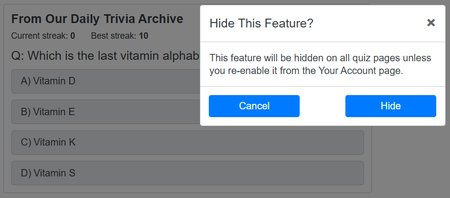
This was a small new feature, yes, but one that we can all love and appreciate. If you happen to miss a day of Trivia, this box can be a reminder that you should go back to the Daily Challenge Archive to complete it, or even answer the questions from the box itself! It's like a magic hat of sorts.
If you have completed every Trivia Challenge already, then this box does have the potential to provide spoilers of questions if you have not taken the Trivia Challenge already that specific day. However, this feature can be easily disabled for the nerds who don't want to accidentally look at what Julius Caesar might have had for lunch on The Ides of March.
My current best streak is 10, as you can see in the image above. I'm sure you can beat that score!
Small Quiz Updates
Hey! Guess what? More new features! Quizmaster must've found some free time lying around because he sure does have a lot of it to attend to the Community's wishes. On top of the entire new Challenges feature and Mini Daily Archive, we now have two small additions to two different quiz formats. Also check out the "small" addition to SVG quizzes after this!
Sudden Death Quizzes
We all know what Sudden Death is: one wrong click and you're out! Now, that isn't exactly the case. Well, I suppose it depends how you click. In this thread by Quizmaster, you now have the ability to right click any Sudden Death answer box in a quiz, which will make a red flag appear in the top right of the specific box.
This flag acts as a Minesweeper flag, if you've ever played Minesweeper. Essentially, by flagging (right-clicking) an answer box, the flag will appear. When the red flag is in a box, that box cannot be selected or chosen as an answer, basically nullifying the box so that you can't click it. This allows you to mark answers you think or know are wrong, so you won't accidentally click them, ending the quiz on the spot.
If you decide you do want to select that box as an answer, simply right-click the box again. This will unflag that specific answer box, reenabling it to be chosen.
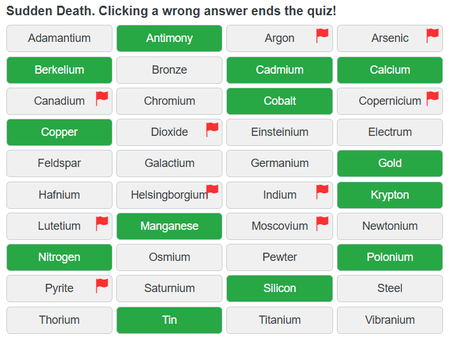
While some Sudden Death boxes are small and others are large, the red flag remains the same size. This means that, if the words in a box are crammed tightly, the flag could be placed on top of the words, creating a funny overlay. If the box is tall and wide enough, this problem will not be an issue. If the box is flat and compressed, then the flag may overlap the text in the box. Not a big problem of course, just unflag that box to read the text.
If you keep an answer box flagged when the quiz ends, those boxes will remained flagged even after the quiz is finished, letting you see where you were hesitant and if you would have been right or wrong. This feature is something I bet you didn't know about, but something that is very useful for all users alike. You can't unflag these boxes when the quiz is over, but just refresh the page and try again!
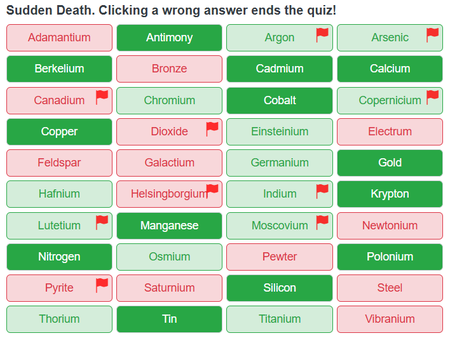
Just like how you can click on an answer box to start the quiz, you can right click on an answer box to flag it, thus starting the quiz that way too.
MasterRocket! I gathered this information during our race. However I tested the new feature on my other SD quizzes. I added these images after our race had concluded, since I wanted images from my most prominent quiz. Just to let you know ;)
Text Quizzes
Text quizzes also received an update. Nothing too major, but an update that will shape future quizzes. In this thread by Quizmaster, you can now change the way columns work in your quizzes. When creating any Text quiz, this new feature allows you to hide certain columns in your quiz so that they won't be revealed in the post-game stats.
To use this feature, you must be making a Text quiz, this way you will have columns to hide. It's located in Step 2, which is the Answer page. Here, find the line that says "Manage Columns". Next to this will be a button that reads "Go". Clicking this button will show a box with all you need for this feature. See the example images below.
To hide any specific column, simply check the box that aligns with the column you want to hide. In the example below, I decided that I wanted to hide my hint column in the post-game stats. So, I checked the box that aligns with "Hint". Now, any user who takes my quiz won't see my hint column after the quiz is over.
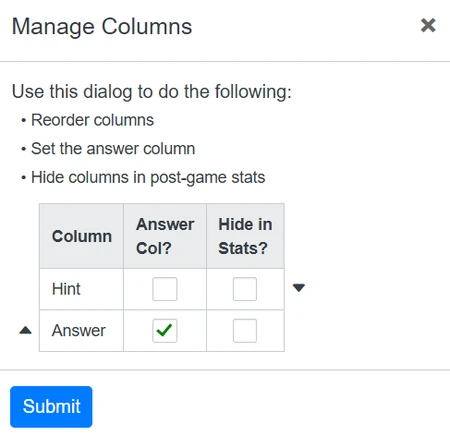
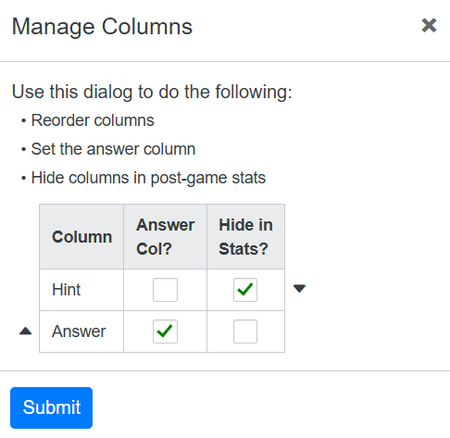
Note that your column might have a different name. If I change my column's name from "Hint" to "Country", for example, then look for that box instead of "Hint". Note that it's still the hint column, just with a different name.
If you add more columns, check all of the ones you want to hide. Maybe you want to leave one hint column but hide the other two you added. You can certainly do that. You can also hide the Answer column if you so please.
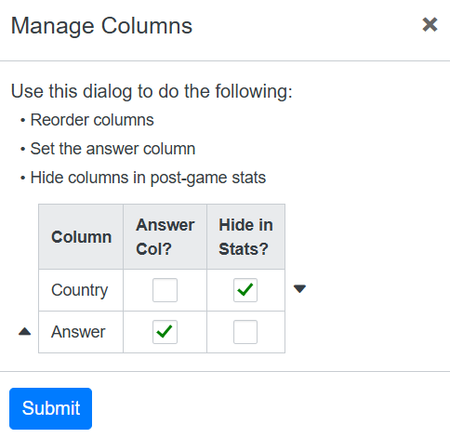
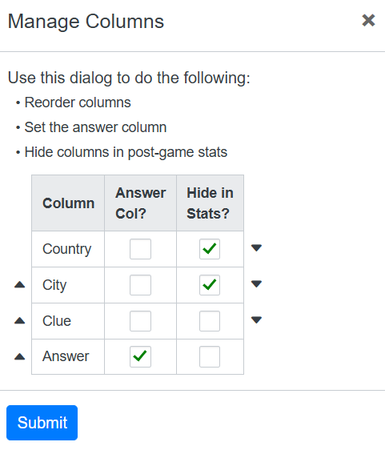
To cancel your changes, just click the "x" in the top right. To save your changes, click the "Submit" button. If you're wondering about the "Answer Col?", that isn't a new feature. That just allows you to easily change which column is the answer column. Pretty simple and useful. You can also easily move your columns' positions here too by clicking those small arrows up or down.
This new feature is fun to play around with. I can't think of many circumstances where it would be useful, but I'm sure you can! It's easy to use and figure out, just do it a few times to get the hang of it. Great additions by the Quizmaster, I presume they will be used fairly often, and if not, are there anyways!
SVG Update
Are you tired of reading about new JetPunk updates yet? Well wake up, because they don't stop here! Quizmaster added another "small" feature to any map quiz you make. I put quotations around small because even though this thread calls it small, I find it to be quite useful and not small at all. Let's talk about it.
You can find this new addition in the tools page of JetPunk. It is not directly accessible, so click the link there, or see the thread linked above. This new feature is a Label Adder. The Label Adder will be the 2nd option, in the middle. Click the middle link and it will take you where you need to be, which is linked below.
What exactly is the Label Adder? The Label Adder is a simple tool that allows you to add Labels to your map quizzes. These Labels will be displayed when the corresponding path (answer) is typed, selected, or clicked correctly, as well as incorrectly, on the map. So even if the user answers the question incorrectly, the Label will still show up near the correct answer on the map.
Well, what do I mean by "show up"? Labels are hidden, or are invisible, to the quiztaker when they start the map quiz. The Label will only appear after the answer has been guessed, either correctly or incorrectly.
Label Usage and Design
Labels can be customized to your liking in the Add SVG Labels page. You are given a bulleted list of how to use the Label Adder, and the layout is very simple too.
Firstly, you need to load in the SVG map you want to add Labels to. You do this by copying the URL of the already live quiz (meaning the quiz must already be submitted before adding Labels; the Label Adder needs a completed SVG quiz) and pasting that URL into the URL slot. Then, hit the blue "Load" button. Your SVG map will appear.
Secondly, you need to add the Labels. This is the fun part. You can design your Labels how you like with the side panel on the right. This panel contains tools like choosing which path (answer) you want to add a Label to, defining the location of the Label as it relates to the given answer, and changing the font size of the Label's words.
Options we don't have are Label/word colors, direct Label size, undo/redo, etc. However, these customization options are still possible in SVG editors like Inkscape, if you know how to use them. With Inkscape, you can upload the SVG with Labels from the Label Adder into Inkscape and fix up the Labels there. If you can't use Inkscape, then sticking to the Label Adder is your best bet.
You can design your Labels all together or individually. Selecting a specific path (answer) allows you to change that individual Label, while the others are unaffected. Note: Once you edit a specific Label, this Label will no long be changed if/when you change back to the "All" Labels option. Individual edits may be essential, as they allow you to make the map less clustered, while also rearranging specific Labels that are too messy or need to be smaller/larger, etc.
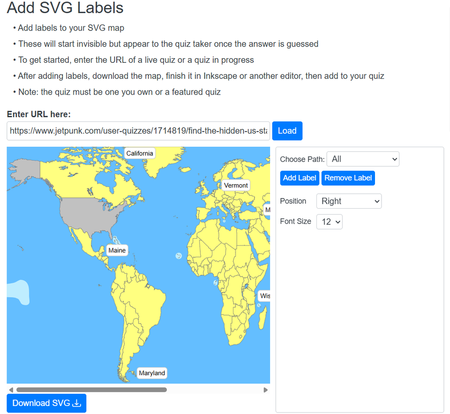
Once you have made all of the customizations you want, Download the SVG map. You can now add it to any map quiz in replacement of whatever map you had before. The Labels will show up when the user guesses it's respective path (answer).
Label Practicality
While Labels may not be the biggest new feature of the year, they still have their respectable uses. Let's say that you make a map quiz and the answers are really small. Adding Labels for these answers would allow the user to see them and locate them more easily than without a Label. Just a thought.
However, Labels are pretty big, and can cover a significant part of the SVG map. This means that some answers on the map can be hidden behind Labels if the Labels are not placed neatly. This is why editing individual Labels is very useful. But again, if you can use an SVG editing app, you can solve this problem. If you can't then too bad.
Labels also let users see the answers they've guessed more easily. Before, a user would need to hover the answer with their mouse to be able to see what it was (I don't even know how it worked on Mobile, maybe it didn't). Now, with the help of Labels, users can see exactly what the answer is without wasting time checking.
As an SVG user and maker, I might consider adding Labels to some of my quizzes. Maybe you will too!
New JetPunk Languages
Hey guess what? Small new fea- well, these new additions to the site aren't really features. However, they're still small new additions! This time, from JetPunk moderator Stewart.
On October 8th, Stewart added a new language... Romanian. See this blog post by user Pixelek23 detailing how and why Romanian was added. As of a few months later, the language section also has around 100 quizzes (I didn't actually count).
This was the first new language added since Azerbaijani back in autumn of 2024. See this thread about Azerbaijani.
Then, on December 1st, user cathlete posted this thread introducing the possibility of another JetPunk language, Catalan. On December 2nd, Stewart added the language!
Catalan has a decently sized user base, with contribution coming regularly, mostly in the form of quizzes. Before, all Catalan quizzes were appended to the broader Spanish section (I think). Now, the Catalan section exists, allowing for the quizzes to be brought over.
User Pixelek23 created a blog mentioning the new language as well, so go check that out if you so please.
User Spotlight Surprise
In the last episode of the Magazine, we saw user Capybarra receive the User Spotlight Surprise for their excellent gameshow blog series and dedication. Now, it's time to introduce the next spotlight!
Second Spotlight: KiloNova's Quizzes
KiloNova is a prominent JetPunk user in the direct community here. His works strike the scene as notable hits, not only his quizzes but his blogs too. However, as of recently, Kilo has acquired some Featured quizzes which I want to recognize, since each of them bring something fun and unique to the JetPunk stage. Let's take a look.
Feature #1 - Multiple Choice City Quiz - Toronto
This quiz was contribution to the famous MCCQ project conducted earlier this year. Users helped the Quizmaster make simple quizzes about notable world cities, and many got Featured. Toronto, created by Kilo, was one of these Features. While it may not be his most spectacular Feature, it is still a Feature, being his first ever!
Feature #2 - Pixel Art Mystery Picture - Flags
This was Kilo's "big" Feature, or his most important one. It was his second Feature, but because the MCCQ Feature was quite small, this could be considered Kilo's first real Feature. This quiz brought a very unique type of quiz to the scene, where by guessing country flags, two big pixelated flags would appear off to the side, which the quiz taker would have to guess as well. The quiz was highlighted by Dimby on the Message Board, where Quizmaster took notice, later Featuring it. A very fun quiz, and definitely deserving of a Feature! He also got a Feature for the Spanish translation here.
Feature #3 - Guess the Mystery Country by Directional Clues
This quiz was his most recent Feature, and a notable one at that. This is because this quiz was made for Gademotsili99's Secret Santa Quiz Exchange, where users made quizzes for other users. Kilo made this quiz for Dimby, where it quickly got Featured under Dimby's account. Dimby was kind enough to give the quiz back to Kilo, whose SVG skills had earned him such a reward. This quiz works like so: you start with an empty map. By guessing countries, arrows will appear instead of the country, with the arrows guiding you to a specific country on the map. The more countries you guess, the more arrows you get as hints. The concept is just as unique as his second Feature, and rightfully got Featured too.
Overall, we can conclude that Dimby is a magical wizard. We can also conclude that KiloNova makes fantastic quizzes that often go unnoticed, but are very deserving of Features. This is often the case when quizmaking, but over time, you too can accumulate a Featured quiz if you offer something new and unique to JetPunk. Go check out Kilo's Hidden Gem blog, where I mention some of his most underrated quizzes. This blog is likely outdated by now since Kilo has grown so much over the year.
Thanks to Kilo for making some awesome quizzes!
This spotlight isn't meant to make anyone feel bad. If you do feel bad that you didn't get a spotlight, please do not feel this way. I love highlighting users who do great things on JetPunk. If I highlighted every user who did great things on JetPunk, the Magazine would surpass the maximum word count limit. I want to display individual users for the things they bring to the site. If you think this is you, then be patient, and maybe I will pick you too. Until then, let's all thank KiloNova for his amazing quizzes!
Customized Jeppy Profile Picture Display Reminder
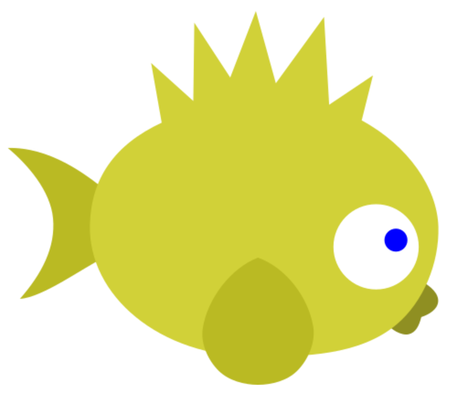
Here is your reminder. I know you forgot. Do you still like your Jeppy?
If you have no idea what I'm talking about, check out this blog with all the details. You can request your own Custom Jeppy in the comments of that blog, and I'll be more than happy to make you one! You can find your, and other, Customized Jeppies here!
The Return of the JetPunk Poem Promenade
Written by LuckyCat
But now I think it's come to stay
I find love and joy in writing for y'all
So let's go back to what we recall
When I was new to this JetPunk thing
I decided to show what I could bringWhen I had ideas for weeks, words to speak
Like a mouse I gave out a little squeak
And my poems grew into something more
With Punkers wanting to share their wordAnd like all good things, it came to an end
Yet, why so soon? It was a splendid trend
So now I will say for all to hear
The Promenade is back with holiday cheerI will send a message out to my crowd
After the New Year, and just as loud
The Art of Misinterpreting
Written by SonyVondern
We misinterpret things all the time. Maybe you received a text from your friend and misinterpreted it, so you go to your friend and ask them about it, only to get a "I didn't mean it that way," or "That's not what I meant!" Maybe you said "good job" to somebody sarcastically but they took it as genuine praise. Maybe you see somebody in a hoodie under a bridge thinking they're up to no good when in reality they're helping out a stray dog. You see misinterpretations everywhere. Some are small and some are big, and some can end up in history textbooks. Let us dive into some misinterpretations.
MISINTERPRETING IN HISTORY
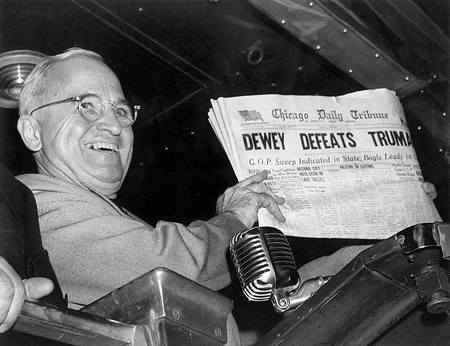
In 1945, when the Allies asked Japan to surrender, Japan used the word mokusatsu, which in the Japanese's eyes, meant "withhold comment," basically meaning they weren't ready to respond yet. The misinterpretation was that mokusatsu also meant "to ignore," and President Harry Truman thought that Japan was saying, "we don't care," leading up to the well-known atomic bombings of Hiroshima and Nagasaki.
The European colonization of the Americas was Columbus misinterpreting the size of Earth and the existence of a whole new continent. Because of his misinterpretation, global history was reshaped to where we are today.
In 1788, the Battle of Karánsebes occurred, where different Austrian scouting forces who were looking for the Ottoman forces, fired on one another, mistaking each other for the Ottomans. Two days later, the real Ottoman forces arrived only to find the bodies of Austrian soldiers.
Human life as we know it could've ended or been almost extinct because of a misinterpretation. In 1962 during the Cuban Missile Crisis, the U.S. Navy discovered Soviet submarine B-59 deep underwater. The U.S. Navy dropped depth charges to make B-59 resurface for identification. The submarine crew noticed the explosions, but they didn't know what was going on. The crew was so deep underwater that it couldn't get any radio signal from anybody. The captain of the submarine was convinced that they should launch a nuclear weapon in the case that nuclear war was occurring, and so did the ship's political officer. Then the vote came to Vasily Arkhipov, the executive officer. Had he agreed to launch the missile could have put the human race in jeopardy, but he hesitated and eventually said no. Later, B-59 resurfaced and the crew was sent home to Moscow.
ENGLISH MISINTERPRETING OTHER LANGUAGES
Did you know that some words in English exist from misinterpretations? Here's a few examples:
ADMIRAL - The word "admiral" comes from Arabic and literally means "commander of the". Yep. Commander of the. The what? The the. Makes sense right? Now lets split admiral into admir and al. You can probably tell that admir comes from the Arabic word amir meaning prince. Classically, it was used to refer to a leader or commander. Now, to show possession in Arabic, you take the possessed item + the + owner (e.g. kalb alrajul, literally "dog the man"). In the same way, Arab naval officers would use this same construction, e.g. amir al-bahr (sea commander). You see where this is going? When the term was brought to the Europeans, they thought "al" was part of "amir" to form the word amiral, which then formed the Medieval Latin word amiral. Then in English, the word became admiral.
CULPRIT - During the 1600s, it was proper legal tradition for prosecutors to open trial by announcing: "culpable, prest d'averrer nostre bille" meaning: guilty, ready to prove our case. Stenographers were tired of writing that over and over again, so they abbreviated it to cul. prit.. The English misinterpreted it as a single word referring to the defendant, which is where we get the word culprit.
AMMO - Ammo, whose long form is ammunition, comes from the French word "munition." To say "the munition" in French, you'd say la munition, but English speakers misunderstood and thought it was l'ammunition, which is where we get ammunition, then ammo.
ANIMAL MEAT - Have you ever enjoyed some nice beef and wondered where it came from? Here's your answer: cow. But why do we call the meat "beef" and not "cow"? After the Norman conquest, the English peasants misinterpreted the French nobles who ate the animals that the peasants farmed. Cow was called boeuf, pig was called porc, sheep was called mouton, and chicken was called poulet. That's how we get the words beef, pork, mutton, and poultry.
So when you think you really misinterpreted something badly, remember it could've been a lot worse or significant. SO significant it could've ended the world or changed the way you speak...
Much thanks to SonyVondern for his article entry. Misinterpreting has changed the course of history multitudes of times, each time shaping something new. It's just what humans do. This article is well researched and nicely put together.
User Quiz Spotlights
Idea and quizzes provided by MeMeMe333
Clear Circle on the World Map by Main City #2 - by scambigol
Pangea by Borders in 90 Seconds - by Lexiconic
Click the Disney Song Title Ending - by MasterRocket
Countries That Start With the Same Letter as Their Continent - by hi111223
US States Quiz But the Wrong State Lights Up - by hi111223
Pixel Art Mystery Picture - Christmas - by KiloNova
Guess the Spinning Country Shapes #1 - by KiloNova
Christianity True or False? - by Pontiac
Phobia - Sudden Death - by Pontiac
Letters In Arrows - by SonyVondern
Reveal and Unscramble Countries - by SonyVondern
Color the Flags - by Tayger and Capybarra
Name a Valid Book of the Bible - by MeMeMe333
Top Ten Letters in Element Names - Sudden Death - by McKenzieFam
Flags of Countries that Appears on the Flag of Kenya - by bantqq1
Spot the Wrong Flags ! - by Anonymousbear25
Solve the Captcha - by teqau
50 largest Empires in History - by jbro
Countries of Europe Quiz But the Letter A is on Vacation - by Wizzandy
Websites by Web Page #1 - by Maxibon
Puzzle Madness - Countries - by Maxibon
Divided Historical Country Names - by Lindwyrm
10 JetPunkers by bad description - Random - by BautyArg
The Pushy Button Quiz - by Dimby
Catch all falling Countries - by Mirko86
U.S States and Chemical Elements - by Pumpkin2017
Much thanks to MeMeMe333 for finding and selecting these quizzes for the spotlight. These quizzes are from users in the community as well as lesser known users. Consider taking these fabulous quizzes! They might be Featured one day...
Quiz Advertisement Selection
Quizzes Selected by Pontiac's Quiz Advertisement Group
Early November saw a reform of my Quiz Advertisement Group (December may also see a reform as well). I see it as a way to advertise quizzes without posting threads about it. Every month will bring new advertised quizzes to more people's attention. This section of the JetPunk Magazine will include the selected quizzes.
November's Selected:
- Countries That Start With The Same Letter As Their Continent - By hi111223
- Name a Country for each Letter and Flag Colour - By Trompete79
- Historical Country Flag and Shape Dominoes - By Lindwyrm
- Passport Screening (Sudden Death) - By cathlete
- Former Countries A-Z - By jhitthepanda
December's Selected
- Chemical Elements That Don't End In -E, -M or -N - By PunkGuy
- Click the Tri-State Border on a US Map - By KiloNova
- Guess the Mystery Country By Directional Clues - By KiloNova
- State Capitals with the Lowest Population Rank in their State - By sacheth9
- The Jeppy of Countries - By LuckyCat
Thank you all for your amazing quizzes! These were the selected quizzes from the QAG Mods (Ptcairn, LuckyCat, MeMeMe333, heyitsRen, and Pontiac). We look forward to advertising more quizzes later!
To join the Quiz Advertisement Group, accept the invite here!
Much thanks to Pontiac for his own advertisement article. These quizzes have been chosen for highlighting, and more will be selected in the months and Magazines to come. As for now, go take some of these quizzes, and maybe even nominate them.
Conclusion
Last edition, I said that it was the longest Magazine to date. Well, we hit a new high with nearly 40,000 characters. JetPunk underwent some plentiful changes this year, from a new Front Page to another new quiz format. However, those weren't even covered in this edition. Instead, all of the many small features Quizmaster added were what brought this edition to life, with each new feature offering something better to the site. I'm glad I could have so much to write about! Go read Stewart's Year in Review blog for 2025, he covers a lot of the same material, and much more!
If you wish to write an article entry of your own, make a blog and collab it with me. I would appreciate this help, since I can't always think of much to say on my own (this time I was spoon-fed things to write about). I'm glad Astana let me continue this tiny portion of her legacy, it really means a lot to me. Don't forget to thank Astana in the comments! Again, if you don't know who Astana was, go read the previous Magazine edition for all the lore.
Thank you for reading, and I hope our community can continue to grow. See you soon.
- Lucky
I hope you enjoyed this edition!
Thanks MeMeMe for the shoutouts ;)
Anyway I do think it would be cool if the 'User Spotlight Surprise' would be passed around, so the first would choose the next person, and so on. Just an idea.
Hopefully next time there will be more names in the 'Directly contributed' section!!!